 Aavtaar
What Happens on an AI Voice Call, Step by Step
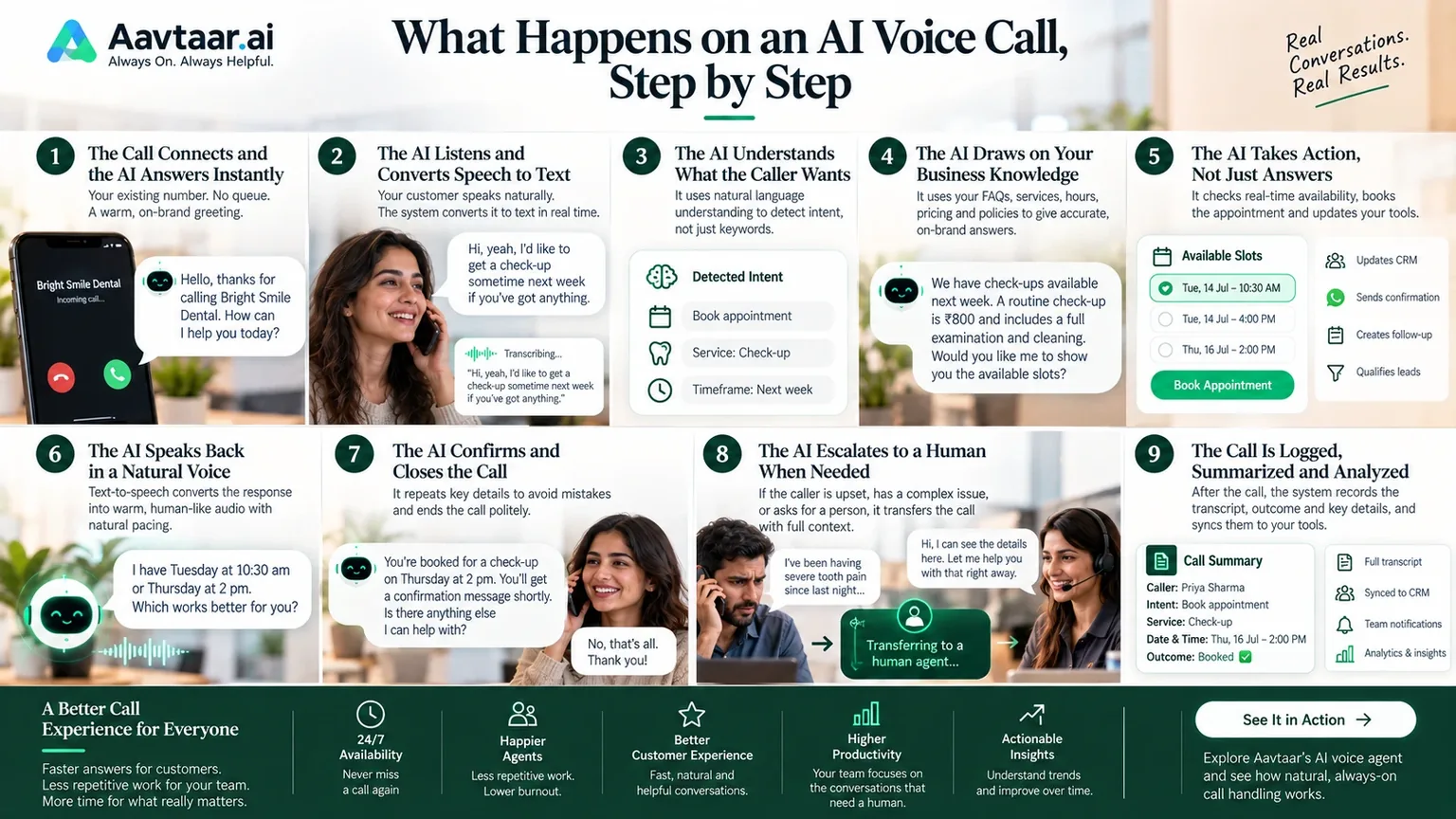
You've probably heard that AI voice agents can answer calls, hold natural conversations, and book appointments without a human on the line. But what actually happens between the first ring and the final goodbye?
For many business owners, the technology feels like a black box. Understanding what goes on inside a call makes it easier to trust, evaluate, and get the most out of it.
Here is a step-by-step walkthrough of a typical AI voice call, using a simple example: a customer calling a dental clinic to book a check-up.
Step 1: The Call Connects and the AI Answers Instantly
The call comes in through your existing phone number. There's no queue and no ringing out. The AI picks up straight away with a greeting written in your brand's voice:
"Hello, thanks for calling Bright Smile Dental. How can I help you today?"
This first moment matters. A quick, warm, natural greeting sets the tone and tells callers they've reached something that can actually help, not a phone menu.
Step 2: The AI Listens and Converts Speech to Text
As the caller speaks, the system uses speech recognition to turn their words into text in real time. Modern systems are built to handle different accents, speaking speeds, background noise, and casual phrasing.
Say the caller replies: "Hi, yeah, I'd like to get a check-up sometime next week if you've got anything."
The system captures that sentence as it's spoken, ready for the next stage.
Step 3: The AI Understands What the Caller Wants
This is where AI voice agents differ most from older phone systems. Instead of matching keywords to a fixed menu, the AI uses natural language understanding to work out intent.
It recognizes that the caller wants to book an appointment, that the appointment type is a check-up, and that the timeframe is next week. The caller didn't need to say "press 1" or use a specific phrase. They just spoke naturally.
This is also why an AI voice agent can handle the many ways people phrase the same request. "Can I come in Tuesday?", "Do you have any openings?", and "I need to see someone soon" can all lead to the same outcome.
Step 4: The AI Draws on Your Business Knowledge
Before responding, the AI refers to what it has been trained on: your FAQs, policies, services, hours, pricing, and tone of voice. This is what keeps answers accurate and on-brand rather than generic.
If the caller had asked, "Do you accept walk-ins?" or "How much is a check-up?", the AI would pull the answer from your approved content instead of guessing. Setting up that knowledge base well is one of the biggest factors in how good the experience feels.
Step 5: The AI Takes Action, Not Just Answers
A good AI voice agent doesn't just talk. It does things. To book the check-up, it connects to your calendar and checks real availability.
"I have Tuesday at 10:30 am or Thursday at 2 pm. Which works better for you?"
The caller picks a slot, and the AI books it, updating your scheduling system in the moment. Depending on how it's configured, it can also:
- Qualify leads by asking the right screening questions
- Update your CRM or helpdesk with the caller's details
- Send a confirmation or reminder by text or WhatsApp
- Route the call or create a task for your team
This ability to complete tasks end to end is what turns a voice agent from a novelty into a genuine team member.
Step 6: The AI Speaks Back in a Natural Voice
Once the AI has decided what to say, text-to-speech converts its response into spoken audio. Today's synthetic voices are designed to sound warm and natural, with sensible pacing and intonation.
The timing matters just as much as the voice. Long pauses feel robotic, so well-built systems are designed to respond quickly and to handle interruptions gracefully. If the caller cuts in with "Actually, make it Thursday," the AI stops, listens, and adjusts rather than talking over them.
Step 7: The AI Confirms and Closes the Call
Before ending, the AI repeats the key details to avoid mistakes:
"You're booked for a check-up on Thursday at 2 pm. You'll get a confirmation message shortly. Is there anything else I can help with?"
If the answer is no, it closes politely. The caller hangs up with a confirmed appointment, and the whole exchange took a couple of minutes, with no hold music and no callback.
Step 8: The AI Escalates to a Human When Needed
Not every call should stay with the AI, and good systems know that. If a caller sounds upset, raises a sensitive issue, mentions an emergency, or asks for a person, the AI transfers the call.
The important part is how. A well-designed handoff passes along the full context, so the human who picks up already knows who's calling, what they need, and what has been said. The customer never has to repeat themselves.
Human handoff isn't a fallback for when the AI fails. It's a deliberate part of the design, which keeps complex or emotional conversations in human hands.
Step 9: The Call Is Logged, Summarized, and Analyzed
After the call ends, the work isn't over. The system records the transcript, outcome, and key details, then syncs them to your tools. Your team can see what was asked, what was resolved, and what still needs follow-up.
Over time, this data reveals patterns: the questions customers ask most, the times of day calls peak, and the points where conversations stall. You can use these insights to refine the AI's knowledge, improve your services, and spot gaps in your process.
Why Understanding the Process Matters
Knowing what happens on an AI voice call helps you evaluate solutions more clearly. When you're comparing options, check each stage:
- Listening: Does it understand real speech, accents included?
- Understanding: Can it handle natural phrasing, not just menu options?
- Knowledge: Can you train it on your own content and tone?
- Action: Does it integrate with your calendar, CRM, and tools?
- Voice: Does it sound natural and respond without awkward gaps?
- Handoff: Does it escalate smoothly with full context?
- Reporting: Do you get transcripts and insights afterward?
If you'd like to see these steps in action, explore Aavtaar's AI voice agent. And if you're still relying on "press 1 for sales" menus, see how AI IVR replaces rigid menus with real conversation.
The Bottom Line
An AI voice call may feel effortless to the caller, but behind the scenes there's a carefully coordinated process: listening, understanding, drawing on knowledge, taking action, responding naturally, and knowing when to bring in a person.
When each step works well, customers get fast, helpful service at any hour, and your team gets freed from repetitive calls to focus on the conversations that matter most.